OSIS is connected to the USPS database for addresses, which is called Finalist. At times, an address will show as invalid.

When an address is invalid, it may need to be forced. Here are the following steps to force an address:
Step One
Before an address can be forced on to OSIS, the following is required:
- If there is a verified current address on the case already, that address must be moved to history before a new one can be added.
- Each party on the case needs a verified address. To verify an address do the following:
- Use the L04. If there is not an address on OSIS to generate the L04, then use the L04U located on the ALC to manually enter the address for verification.
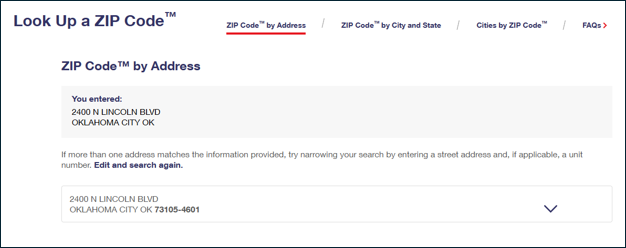
- Or use a screen shot of the USPS website with the verified address.
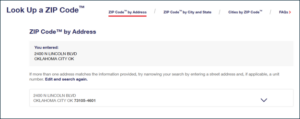
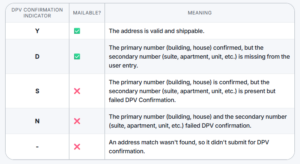
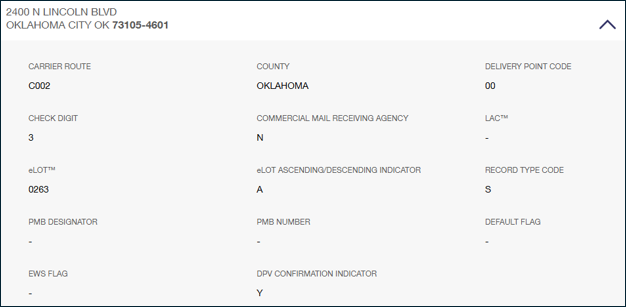
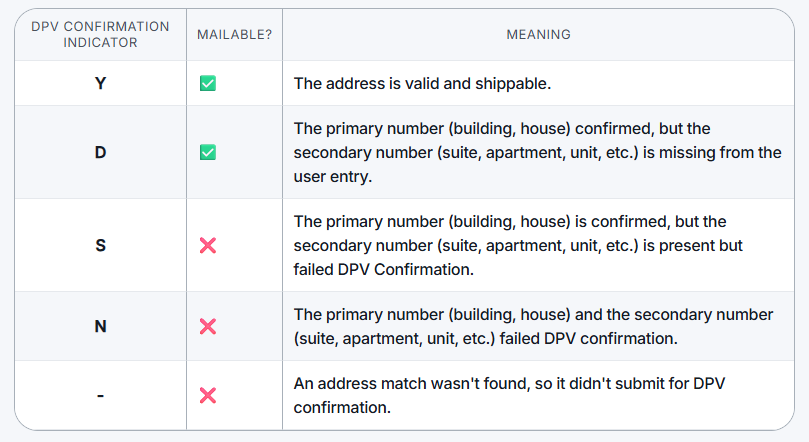
- When using the USPS website to verify an address you must verify the Delivery Point Verification (DPV)
- What is DPV?
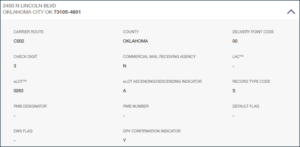
DPV (Delivery Point Validation) is a USPS technology that verifies if a specific mailing address actually exists and is actively deliverable down to the apartment or suite number. It goes beyond standard formatting to ensure the USPS carrier can physically deliver mail there. - To get to the DPV click on the down arrow
Step Two
Once step one has been completed, you will send an email to OCSSAddressChanges@okdhs.org. In the email provide the FGN, the party the address is for (NCP, CP1, CP2, etc.), and the address that needs to be added. Include the L04 or screen shot from the USPS website showing the address is accurate.
Once the address has been updated, you will receive an email confirming the address has been updated.
Step Three
If you need to make an update to an employer address, email EmployerAddressRequest@okdhs.org.
Do not email for the following requests
- AOR Address (Address of Record)
- See instructions for adding an AOR here.
- DOC Address
- Find more info here.
- International Address
- Find more info here.
- In Care Of
- This is worker updated by adding “%” percent sign on the ADDR1 line.
- Employer Address Updates
- Send employer address updates to ESC at EmployerAddressRequest@okdhs.org
***Do not use the # symbol in any field on the address screens in OSIS***
For example, do not enter the address as 123 Main St Apt #5. Instead enter the address as 123 Main St Apt 5.