Please review all CSQuest URA articles as there are several things that need to be understood prior to cross referencing and verifying the URA for a case.

The process of cross referencing is used to attach the URA from a case to the appropriate FGN.

For example, if you see that on the URA screen there is no TANF information on a case, such as no reference case number or no URA to verify, but you know the customer has received TANF services, you need to cross reference the case.

In order to cross reference, you first need to go to the CCPU screen and see if there is a C or H number and a person ID number. If there is no C or H number or no person ID number, you need to do TANF research. If you need help with TANF research, there is a Quest article, TANF Research.

Then go to the CM screen by typing CM and the C or H number.

On the CM screen, look to make sure the parties that are on this reference case number are also on the FGN. Once you have verified that the child or children NCP are on the case number, you can now cross reference.

By the NEXT field, type: XRU, space, the CRH, space and the person ID number, then press enter.

Pressing enter takes you to the XRU screen. Tab down to the ADD field and type in the FGN. Then press Tab, type the CP sequence that is found on CSML, not the CP ID number. Press space, then type letter C and press Enter. The FGN will be added to that reference case number.
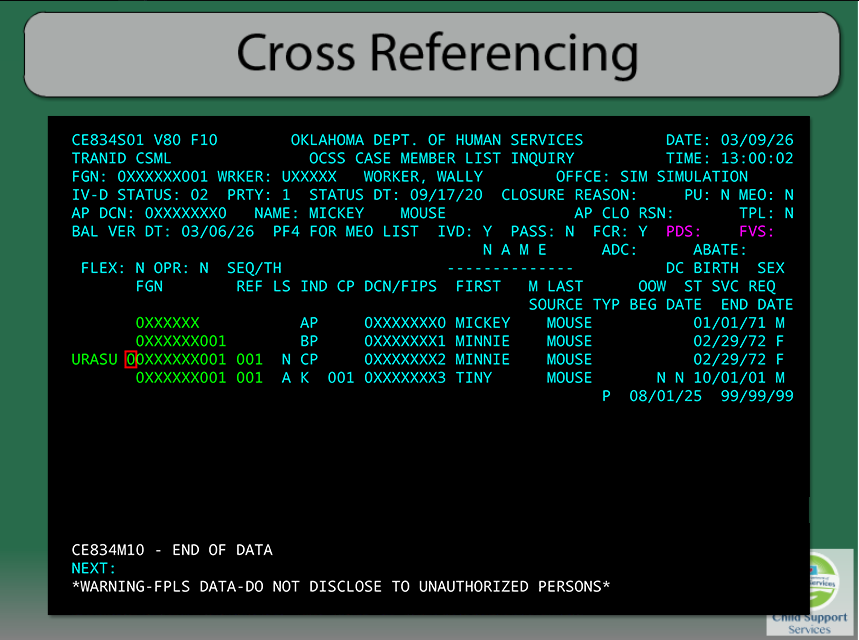
Once the FGN is added, go back to the CSML. Next to the CP you are cross referencing, type URASU (sp) 0, in order to verify the URA.

Sometimes if the CP is on more than one case, the amount may have been verified by someone already. That worker’s name and date will pull over. If not, you simply need to put in today’s date and hit Enter. Make sure the CP has one C or H number with the children of the FGN you are working. If there is more than one reference case, including the parties on the FGN, the C or H numbers might need to be combined.

If you have any questions about cross referencing, you may contact the Finance PFRs or you can ask the Finance workers in your office. Thank you.